
The PDF is a standard format for sharing documents, from user manuals for new gadgets to digital receipts and service agreements. While viewing a PDF is simple, editing one often requires specialized software. Cloud-based PDF editors have become essential tools, allowing users to modify documents directly in a web browser without installing any software. This flexibility is crucial for anyone managing documents across multiple devices, a common scenario in modern consumer technology.
A cloud-based PDF editor is an online service that lets you upload, change, sign, and share PDF files. These platforms offer a range of features, from simple text edits to complex form-filling and document conversion. For consumer tech enthusiasts, this means easily annotating a drone manual, filling out a warranty registration, or signing a contract for a new smart home device from any computer or tablet.
What to Look for in a Cloud-Based PDF Editor
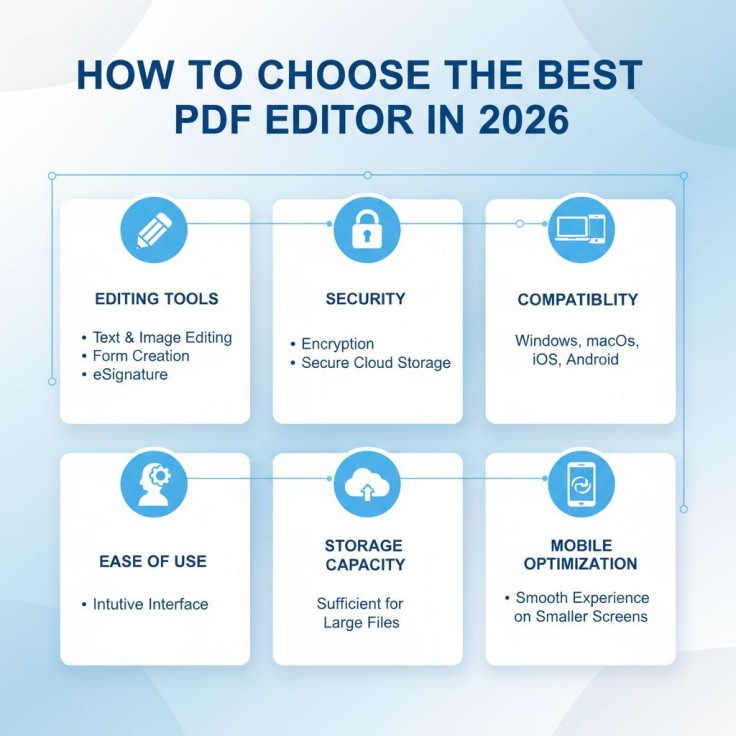
When selecting a cloud-based PDF editor for consumer technology, several key factors influence its usefulness. The best choice will depend on your specific requirements.
- Editing tools: Look for features like text and image editing, form creation, and eSignature capabilities.
- Security: Since many documents contain sensitive information, choose a service that offers encryption and secure cloud storage.
- Compatibility: A good editor should work seamlessly across Windows, macOS, iOS, and Android so you can access your files from any device.
- Ease of use: The best platforms have a clean, intuitive interface that lets you find the tools you need without any technical expertise.
- Storage capacity: Ensure the service offers enough storage to meet your needs, especially if you handle large files.
- Mobile optimization: Choose a platform that works well on mobile devices, offering a smooth experience on smaller screens.
Top 5 Cloud-Based PDF Editors for 2026
In 2026, managing documents is simpler and more efficient than ever. Leading platforms offer powerful features and clean designs, making it easy to handle any form or contract yourself. These tools help you keep up with modern technology, giving you the power to manage your documentation with professional precision.
1. pdfFiller
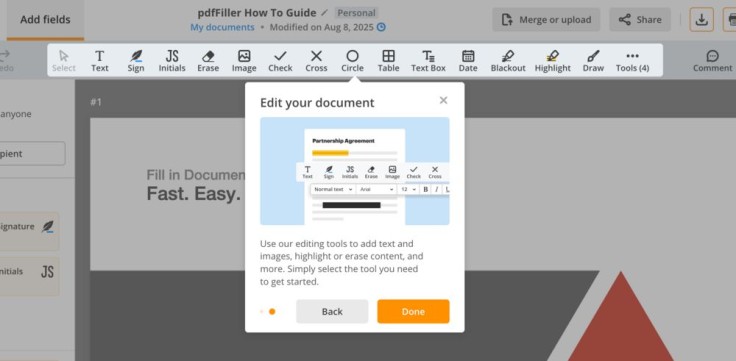
pdfFiller is a comprehensive document management solution that goes beyond basic PDF editing. In pdfFiller, you can create fillable forms, edit PDF documents, add images, and eSign paperwork with legally-binding electronic signatures. It also lets you organize, share, and store your files in the cloud with unlimited storage. Its powerful toolset is presented in an accessible interface, making it suitable for both casual users and small business owners.
2. Adobe Acrobat Online
Adobe, the creator of the PDF format, offers a powerful web-based version of its Acrobat software. Its cloud-based solution provides familiar PDF editing tools accessible through web browsers. The platform leverages Adobe's longstanding presence in document management to offer reliable text editing, page manipulation, and file conversion features. Users benefit from seamless integration with Adobe Creative Cloud applications, though full functionality requires subscription plans that may exceed budgets for casual users.
3. Smallpdf
Smallpdf is known for its simple, task-oriented interface. The homepage presents a collection of tools for specific actions like "Compress PDF," "PDF to Word," and "eSign PDF." This approach makes it fast and easy to perform common tasks without navigating complex menus. Free users can process limited documents daily, while paid subscriptions remove restrictions and add features like batch processing and permanent file storage. It's a good choice for users who need to quickly make a specific change to a document without a steep learning curve.
4. Sejda
Sejda offers a generous free service tier that provides access to more than 30 PDF tools. Its features include text editing, form filling, and page management tools that cover most common consumer needs. A standout feature is its ability to process documents directly from URLs, which is useful for editing online manuals or spec sheets without downloading them first. Its straightforward design focuses on getting tasks done quickly.
5. PDFescape
PDFescape provides basic PDF editing without requiring account creation for simple tasks. The free version supports documents up to 100 pages and 10 MB and allows editing, annotation, and form filling without requiring a login. Paid tiers unlock advanced features, including form creation and document sharing options, though the interface appears less modern compared to competitors.
Comparison of Cloud-Based PDF Editors
| Editor | Free Tier | Pricing | Storage | Mobile Apps | Key Strength |
| pdfFiller | Trial available | Starts at $8/month | Unlimited documents | Yes (iOS and Android) | Comprehensive features and templates |
| Adobe Acrobat Online | Basic viewing, commenting, and some "quick action" tools (like signing or simple conversion) are free with an Adobe ID | Starts at $12.99/month | Free account includes 5 GB of free cloud storage | Yes (iOS and Android) | Brand recognition and reliability |
| Smallpdf | 2 tasks/day | Starts at $9/month | Temporary storage | Yes (iOS and Android), limited access within a Free plan | Simple interface and fast processing |
| PDFescape | Up to 100 pages | Starts at $2.99/month | Online storage from 10 documents in the Free plan to 100 documents on paid accounts | Limited | No account required for basic use |
| Sejda | 3 tasks/hour | Starts at EUR 5.50 /7 daysor EUR 8.50/month | Temporary storage | Web-based and desktop only | Privacy-focused processing |
Why pdfFiller Stands Out for Consumer Tech Needs
While many editors offer basic functionality, pdfFiller provides a complete document management system tailored to real-world applications. For a consumer who just bought a new smart TV, this means they can use one platform to fill out the warranty, sign the service agreement, and securely store the digital receipt and user manual. There is no need to print documents or use multiple single-purpose apps.
pdfFiller addresses common pain points in consumer document management through features that reduce time spent on repetitive tasks. A key benefit for consumer tech users is its extensive library of fillable forms, which includes warranty cards, rebate forms, and service contracts, easily customizable to your brand. The platform also features advanced security protocols, including two-factor authentication and enterprise-grade encryption, ensuring your sensitive information remains protected.
Summing up, cloud-based PDF editors have evolved from simple viewing tools into comprehensive document management platforms. Users selecting solutions for consumer technology applications should evaluate feature sets against their specific needs, considering factors such as usage frequency, document complexity, and budget constraints. Platforms like pdfFiller demonstrate how cloud technology can simplify document workflows while maintaining security and accessibility across devices.


